# Serv00 保活教程
还没有Serv00的可以去申请,免费的,地址在这里点击跳转。
由于Serv00自带的Corn管理根本不管用,很快就会被删除,所以需要借助第三方平台。
**原理**:
- 将serv00上的所有应用启动命令给整理出来
- 创建一个start.sh,并赋权,将上面的命令复制进去
- 保活路径指定运行start.sh文件,然后完成保活
# 使用HuggingFace进行保活
## Dockerfile
```
FROM python:3.8-slim-buster
WORKDIR /app
RUN apt-get update && apt-get install -y openssh-client
RUN pip install paramiko schedule flask
COPY vps_monitor.py .
EXPOSE 8080
CMD ["python", "-u", "vps_monitor.py"]
```
## vps_monitor.py
```python
import paramiko
import schedule
import time
import os
import sys
from flask import Flask, jsonify, render_template_string
from threading import Thread
import logging
app = Flask(__name__)
vps_status = {}
# 设置日志
logging.basicConfig(
level=logging.INFO,
format='%(asctime)s - %(levelname)s - %(message)s',
handlers=[
logging.StreamHandler(sys.stdout),
logging.StreamHandler(sys.stderr)
]
)
logger = logging.getLogger()
def get_vps_configs():
configs = []
index = 1
while True:
hostname = os.environ.get(f'HOSTNAME_{index}')
if not hostname:
break
config = {
'index': index,
'hostname': hostname,
'username': os.environ.get(f'USERNAME_{index}'),
'password': os.environ.get(f'PASSWORD_{index}'),
'script_path': os.environ.get(f'SCRIPT_PATH_{index}')
}
configs.append(config)
logger.info(f"Config {index}: {config['hostname']}, {config['username']}, {config['script_path']}")
index += 1
return configs
def check_and_run_script(config):
logger.info(f"Checking VPS {config['index']}: {config['hostname']}")
client = None
try:
client = paramiko.SSHClient()
client.set_missing_host_key_policy(paramiko.AutoAddPolicy())
client.connect(
hostname=config['hostname'],
username=config['username'],
password=config['password'],
port=22
)
script_path = config['script_path']
script_name = os.path.basename(script_path)
check_command = f"ps -eo args | grep {script_name} | grep -v grep"
stdin, stdout, stderr = client.exec_command(check_command)
output = stdout.read().decode('utf-8').strip()
if output and script_path in output:
status = "Running"
logger.info(f"Script is running on {config['hostname']}")
else:
logger.info(f"Script not running on {config['hostname']}. Executing restart script.")
restart_command = f"nohup /bin/sh {script_path} > /dev/null 2>&1 &"
stdin, stdout, stderr = client.exec_command(restart_command)
status = "Restarted"
logger.info(f"Script restarted on {config['hostname']}")
vps_status[f"{config['hostname']}_{config['index']}"] = {
'index': config['index'],
'status': status,
'last_check': time.strftime('%Y-%m-%d %H:%M:%S'),
'username': config['username']
}
except Exception as e:
logger.error(f"Error occurred while checking VPS {config['index']} - {config['hostname']}: {str(e)}")
vps_status[f"{config['hostname']}_{config['index']}"] = {
'index': config['index'],
'status': f"Error: {str(e)}",
'last_check': time.strftime('%Y-%m-%d %H:%M:%S'),
'username': config['username']
}
finally:
if client:
client.close()
def check_all_vps():
logger.info("Starting VPS check")
vps_configs = get_vps_configs()
for config in vps_configs:
check_and_run_script(config)
# 创建表格头
table = "+---------+-----------------------+----------+-------------------------+----------+\n"
table += "| Index | Hostname | Status | Last Check | Username |\n"
table += "+---------+-----------------------+----------+-------------------------+----------+\n"
# 添加每个VPS的状态
for hostname_index, status in vps_status.items():
table += "| {:<7} | {:<21} | {:<8} | {:<23} | {:<8} |\n".format(
status['index'],
hostname_index.split('_')[0][:21],
status['status'][:8],
status['last_check'],
status['username'][:8]
)
table += "+---------+-----------------------+----------+-------------------------+----------+\n"
logger.info("\n" + table)
@app.route('/')
def index():
html = '''
VPS Status Overview
| Index | Hostname | Status | Last Check | Username |
|---|---|---|---|---|
| {{ data.index }} | {{ hostname_index.split('_')[0] }} | {{ data.status }} | {{ data.last_check }} | {{ data.username }} |
'''
return render_template_string(html, vps_status=vps_status)
@app.route('/status/
def vps_status_detail(hostname_index):
if hostname_index in vps_status:
return jsonify(vps_status[hostname_index])
else:
return jsonify({"error": "VPS not found"}), 404
@app.route('/health')
def health_check():
return jsonify({"status": "healthy", "uptime": time.time() - start_time}), 200
def run_flask():
app.run(host='0.0.0.0', port=8080)
def main():
global start_time
start_time = time.time()
logger.info("===== VPS monitoring script is starting =====")
flask_thread = Thread(target=run_flask)
flask_thread.start()
logger.info("Flask server started in background")
vps_configs = get_vps_configs()
logger.info(f"Found {len(vps_configs)} VPS configurations")
logger.info("Running initial VPS check")
check_all_vps()
##### 修改这里为需要的时间 #####
schedule.every(45).minutes.do(check_all_vps)
logger.info("Scheduled VPS check every 45 minutes")
logger.info("===== VPS monitoring script is running =====")
heartbeat_count = 0
while True:
schedule.run_pending()
time.sleep(60)
heartbeat_count += 1
if heartbeat_count % 5 == 0: # 每5分钟输出一次心跳信息
logger.info(f"Heartbeat: Script is still running. Uptime: {heartbeat_count} minutes")
if __name__ == "__main__":
main()
```
## README.md
```markdown
# 在原文的基础上加上端口
app_port: 8080
```
## 环境变量
```
USERNAME_1
HOSTNAME_1
PASSWORD_1
SCRIPT_PATH_1
USERNAME_2
HOSTNAME_2
PASSWORD_2
SCRIPT_PATH_2
```
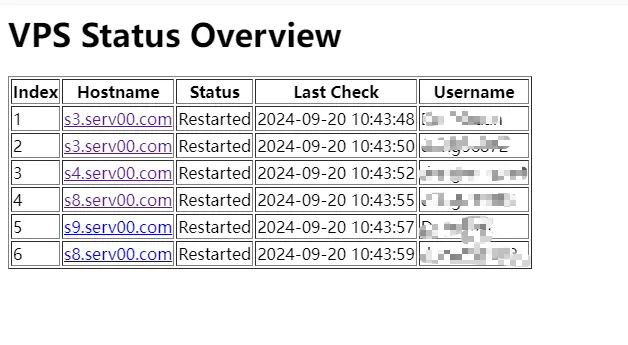
`USERNAME`为serv00用户名,`HOSTNAME`为主机名(如:`s3.serv00.com`),`PASSWORD`为serv00密码,`SCRIPT_PATH`为执行脚本的绝对路径(如:`/usr/home/serv00用户名/domains/域名/public_html/restart.sh`)
# 使用青龙面板保活
在青龙面板中创建一个定时任务,命令如下
```bash
sshpass -p '密码' ssh -o StrictHostKeyChecking=no -o UserKnownHostsFile=/dev/null -tt 账号@host地址 "/home/用户名/start.sh"
```
# 使用CloudFlare保活
## 在cloudflare创建worker
```js
addEventListener('fetch', event => {
event.respondWith(handleRequest(event.request))
})
addEventListener('scheduled', event => {
event.waitUntil(handleScheduled(event.scheduledTime))
})
async function handleRequest(request) {
const url = new URL(request.url)
if (url.pathname === '/login' && request.method === 'POST') {
const formData = await request.formData()
const password = formData.get('password')
if (password === PASSWORD) {
const response = new Response(JSON.stringify({ success: true }), {
headers: { 'Content-Type': 'application/json' }
})
response.headers.set('Set-Cookie', `auth=${PASSWORD}; HttpOnly; Secure; SameSite=Strict; Path=/; Max-Age=86400`)
return response
} else {
return new Response(JSON.stringify({ success: false }), {
headers: { 'Content-Type': 'application/json' }
})
}
} else if (url.pathname === '/run' && request.method === 'POST') {
if (!isAuthenticated(request)) {
return new Response('Unauthorized', { status: 401 })
}
await handleScheduled(new Date().toISOString())
const results = await CRON_RESULTS.get('lastResults', 'json')
return new Response(JSON.stringify(results), {
headers: { 'Content-Type': 'application/json' }
})
} else if (url.pathname === '/results' && request.method === 'GET') {
if (!isAuthenticated(request)) {
return new Response(JSON.stringify({ authenticated: false }), {
headers: { 'Content-Type': 'application/json' }
})
}
const results = await CRON_RESULTS.get('lastResults', 'json')
return new Response(JSON.stringify({ authenticated: true, results: results || [] }), {
headers: { 'Content-Type': 'application/json' }
})
} else if (url.pathname === '/check-auth' && request.method === 'GET') {
return new Response(JSON.stringify({ authenticated: isAuthenticated(request) }), {
headers: { 'Content-Type': 'application/json' }
})
} else {
// 显示登录页面或结果页面的 HTML
return new Response(getHtmlContent(), {
headers: { 'Content-Type': 'text/html' },
})
}
}
function isAuthenticated(request) {
const cookies = request.headers.get('Cookie')
if (cookies) {
const authCookie = cookies.split(';').find(c => c.trim().startsWith('auth='))
if (authCookie) {
const authValue = authCookie.split('=')[1]
return authValue === PASSWORD
}
}
return false
}
function getHtmlContent() {
return `
Worker Control Panel
| Account | Type | Status | Message | Last Run |
|---|
`;
}
async function handleScheduled(scheduledTime) {
const accountsData = JSON.parse(ACCOUNTS_JSON);
const accounts = accountsData.accounts;
let results = [];
for (const account of accounts) {
const result = await loginAccount(account);
results.push(result);
await delay(Math.floor(Math.random() * 8000) + 1000);
}
// 保存结果到 KV 存储
await CRON_RESULTS.put('lastResults', JSON.stringify(results));
}
function generateRandomUserAgent() {
const browsers = ['Chrome', 'Firefox', 'Safari', 'Edge', 'Opera'];
const browser = browsers[Math.floor(Math.random() * browsers.length)];
const version = Math.floor(Math.random() * 100) + 1;
const os = ['Windows NT 10.0', 'Macintosh', 'X11'];
const selectedOS = os[Math.floor(Math.random() * os.length)];
const osVersion = selectedOS === 'X11' ? 'Linux x86_64' : selectedOS === 'Macintosh' ? 'Intel Mac OS X 10_15_7' : 'Win64; x64';
return `Mozilla/5.0 (${selectedOS}; ${osVersion}) AppleWebKit/537.36 (KHTML, like Gecko) ${browser}/${version}.0.0.0 Safari/537.36`;
}
async function loginAccount(account) {
const { username, password, panelnum, type, cronCommands } = account
let baseUrl = type === 'ct8'
? 'https://panel.ct8.pl'
: `https://panel${panelnum}.serv00.com`
let loginUrl = `${baseUrl}/login/?next=/cron/`
const userAgent = generateRandomUserAgent();
try {
const response = await fetch(loginUrl, {
method: 'GET',
headers: {
'User-Agent': userAgent,
},
})
const pageContent = await response.text()
const csrfMatch = pageContent.match(/name="csrfmiddlewaretoken" value="([^"]*)"/)
const csrfToken = csrfMatch ? csrfMatch[1] : null
if (!csrfToken) {
throw new Error('CSRF token not found')
}
const initialCookies = response.headers.get('set-cookie') || ''
const formData = new URLSearchParams({
'username': username,
'password': password,
'csrfmiddlewaretoken': csrfToken,
'next': '/cron/'
})
const loginResponse = await fetch(loginUrl, {
method: 'POST',
headers: {
'Content-Type': 'application/x-www-form-urlencoded',
'Referer': loginUrl,
'User-Agent': userAgent,
'Cookie': initialCookies,
},
body: formData.toString(),
redirect: 'manual'
})
if (loginResponse.status === 302 && loginResponse.headers.get('location') === '/cron/') {
const loginCookies = loginResponse.headers.get('set-cookie') || ''
const allCookies = combineCookies(initialCookies, loginCookies)
// 访问 cron 列表页面
const cronListUrl = `${baseUrl}/cron/`
const cronListResponse = await fetch(cronListUrl, {
headers: {
'Cookie': allCookies,
'User-Agent': userAgent,
}
})
const cronListContent = await cronListResponse.text()
console.log(`Cron list URL: ${cronListUrl}`)
console.log(`Cron list response status: ${cronListResponse.status}`)
console.log(`Cron list content (first 1000 chars): ${cronListContent.substring(0, 1000)}`)
let cronResults = [];
for (const cronCommand of cronCommands) {
if (!cronListContent.includes(cronCommand)) {
// 访问添加 cron 任务页面
const addCronUrl = `${baseUrl}/cron/add`
const addCronPageResponse = await fetch(addCronUrl, {
headers: {
'Cookie': allCookies,
'User-Agent': userAgent,
'Referer': cronListUrl,
}
})
const addCronPageContent = await addCronPageResponse.text()
console.log(`Add cron page URL: ${addCronUrl}`)
console.log(`Add cron page response status: ${addCronPageResponse.status}`)
console.log(`Add cron page content (first 1000 chars): ${addCronPageContent.substring(0, 1000)}`)
const newCsrfMatch = addCronPageContent.match(/name="csrfmiddlewaretoken" value="([^"]*)"/)
const newCsrfToken = newCsrfMatch ? newCsrfMatch[1] : null
if (!newCsrfToken) {
throw new Error('New CSRF token not found for adding cron task')
}
const formData = new URLSearchParams({
'csrfmiddlewaretoken': newCsrfToken,
'spec': 'manual',
'minute_time_interval': 'on',
'minute': '15',
'hour_time_interval': 'each',
'hour': '*',
'day_time_interval': 'each',
'day': '*',
'month_time_interval': 'each',
'month': '*',
'dow_time_interval': 'each',
'dow': '*',
'command': cronCommand,
'comment': 'Auto added cron job'
})
console.log('Form data being sent:', formData.toString())
const { success, response: addCronResponse, content: addCronResponseContent } = await addCronWithRetry(addCronUrl, {
method: 'POST',
headers: {
'Content-Type': 'application/x-www-form-urlencoded',
'Cookie': allCookies,
'User-Agent': userAgent,
'Referer': addCronUrl,
'Origin': baseUrl,
'Accept': 'text/html,application/xhtml+xml,application/xml;q=0.9,image/webp,*/*;q=0.8',
'Accept-Language': 'en-US,en;q=0.5',
'Upgrade-Insecure-Requests': '1'
},
body: formData.toString(),
})
console.log('Full response content:', addCronResponseContent)
if (success) {
if (addCronResponseContent.includes('Cron job has been added') || addCronResponseContent.includes('Zadanie cron zostało dodane')) {
const message = `添加了新的 cron 任务:${cronCommand}`;
console.log(message);
await sendTelegramMessage(`账号 ${username} (${type}) ${message}`);
cronResults.push({ success: true, message });
} else {
// 如果响应中没有成功信息,再次检查cron列表
const checkCronListResponse = await fetch(cronListUrl, {
headers: {
'Cookie': allCookies,
'User-Agent': userAgent,
}
});
const checkCronListContent = await checkCronListResponse.text();
if (checkCronListContent.includes(cronCommand)) {
const message = `确认添加了新的 cron 任务:${cronCommand}`;
console.log(message);
await sendTelegramMessage(`账号 ${username} (${type}) ${message}`);
cronResults.push({ success: true, message });
} else {
const message = `尝试添加 cron 任务:${cronCommand},但在列表中未找到。可能添加失败。`;
console.error(message);
cronResults.push({ success: false, message });
}
}
} else {
const message = `添加 cron 任务失败:${cronCommand}`;
console.error(message);
cronResults.push({ success: false, message });
}
} else {
const message = `cron 任务已存在:${cronCommand}`;
console.log(message);
cronResults.push({ success: true, message });
}
}
return { username, type, cronResults, lastRun: new Date().toISOString() };
} else {
const message = `登录失败,未知原因。请检查账号和密码是否正确。`;
console.error(message);
return { username, type, cronResults: [{ success: false, message }], lastRun: new Date().toISOString() };
}
} catch (error) {
const message = `登录或添加 cron 任务时出现错误: ${error.message}`;
console.error(message);
return { username, type, cronResults: [{ success: false, message }], lastRun: new Date().toISOString() };
}
}
async function addCronWithRetry(url, options, maxRetries = 3) {
for (let i = 0; i < maxRetries; i++) {
try {
const response = await fetch(url, options);
const responseContent = await response.text();
console.log(`Attempt ${i + 1} response status:`, response.status);
console.log(`Attempt ${i + 1} response content (first 1000 chars):`, responseContent.substring(0, 1000));
if (response.status === 200 || response.status === 302 || responseContent.includes('Cron job has been added') || responseContent.includes('Zadanie cron zostało dodane')) {
return { success: true, response, content: responseContent };
}
} catch (error) {
console.error(`Attempt ${i + 1} failed:`, error);
}
await delay(2000); // Wait 2 seconds before retrying
}
return { success: false };
}
function combineCookies(cookies1, cookies2) {
const cookieMap = new Map()
const parseCookies = (cookieString) => {
cookieString.split(',').forEach(cookie => {
const [fullCookie] = cookie.trim().split(';')
const [name, value] = fullCookie.split('=')
if (name && value) {
cookieMap.set(name.trim(), value.trim())
}
})
}
parseCookies(cookies1)
parseCookies(cookies2)
return Array.from(cookieMap.entries()).map(([name, value]) => `${name}=${value}`).join('; ')
}
async function sendTelegramMessage(message) {
const telegramConfig = JSON.parse(TELEGRAM_JSON)
const { telegramBotToken, telegramBotUserId } = telegramConfig
const url = `https://api.telegram.org/bot${telegramBotToken}/sendMessage`
try {
await fetch(url, {
method: 'POST',
headers: { 'Content-Type': 'application/json' },
body: JSON.stringify({
chat_id: telegramBotUserId,
text: message
})
})
} catch (error) {
console.error('Error sending Telegram message:', error)
}
}
function delay(ms) {
return new Promise(resolve => setTimeout(resolve, ms))
}
```
## 创建变量
在设置的变量和机密添加
`ACCOUNTS_JSON`
```json
{
"accounts": [
{
"username": "user1",
"password": "password1",
"type": "ct8",
"cronCommands": [
"你的命令,不仅仅只是绝对路径,比如 bash /home/dd/start.sh"
]
},
{
"username": "user2",
"password": "password2",
"panelnum": "2", //面板号
"type": "serv00",
"cronCommands": [
"你的命令"
]
}
]
}
```
`TELEGRAM_JSON`
```json
{
"telegramBotToken": "YOUR_BOT_TOKEN",
"telegramBotUserId": "YOUR_USER_ID"
}
```
`PASSWORD`:你访问worker面板的密码
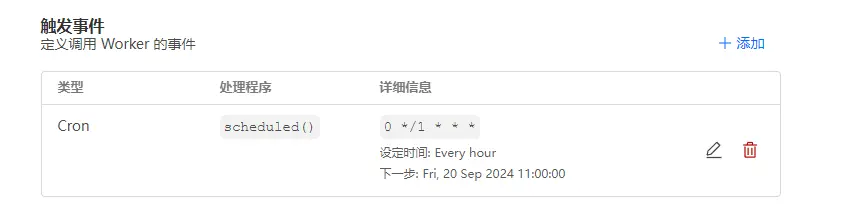
## 添加Cron
**为了避免频繁登录执行脚本,建议各位佬友把时间填1-12h为宜**
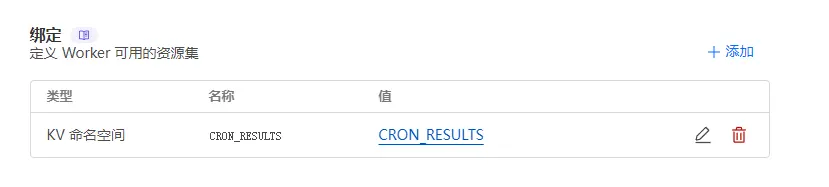
## 创建一个KV变量
创建一个名为`CRON_RESULTS`的KV变量,并绑定到workers。
## 绑定自定义域名
**现在已经大功告成了**,访问你的worker网站并输入密码
这个面板会记录你最后一次执行的命令结果,包括你手动执行或者是设置的定时Cron
## PS:拓展
提供一个新的界面
```js
addEventListener('fetch', event => {
event.respondWith(handleRequest(event.request))
})
addEventListener('scheduled', event => {
event.waitUntil(handleScheduled(event.scheduledTime))
})
async function handleRequest(request) {
const url = new URL(request.url)
if (url.pathname === '/login' && request.method === 'POST') {
const formData = await request.formData()
const password = formData.get('password')
if (password === PASSWORD) {
const response = new Response(JSON.stringify({ success: true }), {
headers: { 'Content-Type': 'application/json' }
})
response.headers.set('Set-Cookie', `auth=${PASSWORD}; HttpOnly; Secure; SameSite=Strict; Path=/; Max-Age=86400`)
return response
} else {
return new Response(JSON.stringify({ success: false }), {
headers: { 'Content-Type': 'application/json' }
})
}
} else if (url.pathname === '/run' && request.method === 'POST') {
if (!isAuthenticated(request)) {
return new Response('Unauthorized', { status: 401 })
}
await handleScheduled(new Date().toISOString())
const results = await CRON_RESULTS.get('lastResults', 'json')
return new Response(JSON.stringify(results), {
headers: { 'Content-Type': 'application/json' }
})
} else if (url.pathname === '/results' && request.method === 'GET') {
if (!isAuthenticated(request)) {
return new Response(JSON.stringify({ authenticated: false }), {
headers: { 'Content-Type': 'application/json' }
})
}
const results = await CRON_RESULTS.get('lastResults', 'json')
return new Response(JSON.stringify({ authenticated: true, results: results || [] }), {
headers: { 'Content-Type': 'application/json' }
})
} else if (url.pathname === '/check-auth' && request.method === 'GET') {
return new Response(JSON.stringify({ authenticated: isAuthenticated(request) }), {
headers: { 'Content-Type': 'application/json' }
})
} else {
// 显示登录页面或结果页面的 HTML
return new Response(getHtmlContent(), {
headers: { 'Content-Type': 'text/html' },
})
}
}
function isAuthenticated(request) {
const cookies = request.headers.get('Cookie')
if (cookies) {
const authCookie = cookies.split(';').find(c => c.trim().startsWith('auth='))
if (authCookie) {
const authValue = authCookie.split('=')[1]
return authValue === PASSWORD
}
}
return false
}
function getHtmlContent() {
return `
Serv00 Monitor
| Account (账户) |
Type (类型) |
Status (状态) |
Message (信息) | Last Run (最后运行时间) |
|---|
`;
}
async function handleScheduled(scheduledTime) {
const accountsData = JSON.parse(ACCOUNTS_JSON);
const accounts = accountsData.accounts;
let results = [];
for (const account of accounts) {
const result = await loginAccount(account);
results.push(result);
await delay(Math.floor(Math.random() * 8000) + 1000);
}
// 保存结果到 KV 存储
await CRON_RESULTS.put('lastResults', JSON.stringify(results));
}
function generateRandomUserAgent() {
const browsers = ['Chrome', 'Firefox', 'Safari', 'Edge', 'Opera'];
const browser = browsers[Math.floor(Math.random() * browsers.length)];
const version = Math.floor(Math.random() * 100) + 1;
const os = ['Windows NT 10.0', 'Macintosh', 'X11'];
const selectedOS = os[Math.floor(Math.random() * os.length)];
const osVersion = selectedOS === 'X11' ? 'Linux x86_64' : selectedOS === 'Macintosh' ? 'Intel Mac OS X 10_15_7' : 'Win64; x64';
return `Mozilla/5.0 (${selectedOS}; ${osVersion}) AppleWebKit/537.36 (KHTML, like Gecko) ${browser}/${version}.0.0.0 Safari/537.36`;
}
async function loginAccount(account) {
const { username, password, panelnum, type, cronCommands } = account
let baseUrl = type === 'ct8'
? 'https://panel.ct8.pl'
: `https://panel${panelnum}.serv00.com`
let loginUrl = `${baseUrl}/login/?next=/cron/`
const userAgent = generateRandomUserAgent();
try {
const response = await fetch(loginUrl, {
method: 'GET',
headers: {
'User-Agent': userAgent,
},
})
const pageContent = await response.text()
const csrfMatch = pageContent.match(/name="csrfmiddlewaretoken" value="([^"]*)"/)
const csrfToken = csrfMatch ? csrfMatch[1] : null
if (!csrfToken) {
throw new Error('CSRF token not found')
}
const initialCookies = response.headers.get('set-cookie') || ''
const formData = new URLSearchParams({
'username': username,
'password': password,
'csrfmiddlewaretoken': csrfToken,
'next': '/cron/'
})
const loginResponse = await fetch(loginUrl, {
method: 'POST',
headers: {
'Content-Type': 'application/x-www-form-urlencoded',
'Referer': loginUrl,
'User-Agent': userAgent,
'Cookie': initialCookies,
},
body: formData.toString(),
redirect: 'manual'
})
if (loginResponse.status === 302 && loginResponse.headers.get('location') === '/cron/') {
const loginCookies = loginResponse.headers.get('set-cookie') || ''
const allCookies = combineCookies(initialCookies, loginCookies)
// 访问 cron 列表页面
const cronListUrl = `${baseUrl}/cron/`
const cronListResponse = await fetch(cronListUrl, {
headers: {
'Cookie': allCookies,
'User-Agent': userAgent,
}
})
const cronListContent = await cronListResponse.text()
console.log(`Cron list URL: ${cronListUrl}`)
console.log(`Cron list response status: ${cronListResponse.status}`)
console.log(`Cron list content (first 1000 chars): ${cronListContent.substring(0, 1000)}`)
let cronResults = [];
for (const cronCommand of cronCommands) {
if (!cronListContent.includes(cronCommand)) {
// 访问添加 cron 任务页面
const addCronUrl = `${baseUrl}/cron/add`
const addCronPageResponse = await fetch(addCronUrl, {
headers: {
'Cookie': allCookies,
'User-Agent': userAgent,
'Referer': cronListUrl,
}
})
const addCronPageContent = await addCronPageResponse.text()
console.log(`Add cron page URL: ${addCronUrl}`)
console.log(`Add cron page response status: ${addCronPageResponse.status}`)
console.log(`Add cron page content (first 1000 chars): ${addCronPageContent.substring(0, 1000)}`)
const newCsrfMatch = addCronPageContent.match(/name="csrfmiddlewaretoken" value="([^"]*)"/)
const newCsrfToken = newCsrfMatch ? newCsrfMatch[1] : null
if (!newCsrfToken) {
throw new Error('New CSRF token not found for adding cron task')
}
const formData = new URLSearchParams({
'csrfmiddlewaretoken': newCsrfToken,
'spec': 'manual',
'minute_time_interval': 'on',
'minute': '15',
'hour_time_interval': 'each',
'hour': '*',
'day_time_interval': 'each',
'day': '*',
'month_time_interval': 'each',
'month': '*',
'dow_time_interval': 'each',
'dow': '*',
'command': cronCommand,
'comment': 'Auto added cron job'
})
console.log('Form data being sent:', formData.toString())
const { success, response: addCronResponse, content: addCronResponseContent } = await addCronWithRetry(addCronUrl, {
method: 'POST',
headers: {
'Content-Type': 'application/x-www-form-urlencoded',
'Cookie': allCookies,
'User-Agent': userAgent,
'Referer': addCronUrl,
'Origin': baseUrl,
'Accept': 'text/html,application/xhtml+xml,application/xml;q=0.9,image/webp,*/*;q=0.8',
'Accept-Language': 'en-US,en;q=0.5',
'Upgrade-Insecure-Requests': '1'
},
body: formData.toString(),
})
console.log('Full response content:', addCronResponseContent)
if (success) {
if (addCronResponseContent.includes('Cron job has been added') || addCronResponseContent.includes('Zadanie cron zostało dodane')) {
const message = `添加了新的 cron 任务:${cronCommand}`;
console.log(message);
await sendTelegramMessage(`账号 ${username} (${type}) ${message}`);
cronResults.push({ success: true, message });
} else {
// 如果响应中没有成功信息,再次检查cron列表
const checkCronListResponse = await fetch(cronListUrl, {
headers: {
'Cookie': allCookies,
'User-Agent': userAgent,
}
});
const checkCronListContent = await checkCronListResponse.text();
if (checkCronListContent.includes(cronCommand)) {
const message = `确认添加了新的 cron 任务:${cronCommand}`;
console.log(message);
await sendTelegramMessage(`账号 ${username} (${type}) ${message}`);
cronResults.push({ success: true, message });
} else {
const message = `尝试添加 cron 任务:${cronCommand},但在列表中未找到。可能添加失败。`;
console.error(message);
cronResults.push({ success: false, message });
}
}
} else {
const message = `添加 cron 任务失败:${cronCommand}`;
console.error(message);
cronResults.push({ success: false, message });
}
} else {
const message = `cron 任务已存在:${cronCommand}`;
console.log(message);
cronResults.push({ success: true, message });
}
}
return { username, type, cronResults, lastRun: new Date().toISOString() };
} else {
const message = `登录失败,未知原因。请检查账号和密码是否正确。`;
console.error(message);
return { username, type, cronResults: [{ success: false, message }], lastRun: new Date().toISOString() };
}
} catch (error) {
const message = `登录或添加 cron 任务时出现错误: ${error.message}`;
console.error(message);
return { username, type, cronResults: [{ success: false, message }], lastRun: new Date().toISOString() };
}
}
async function addCronWithRetry(url, options, maxRetries = 3) {
for (let i = 0; i < maxRetries; i++) {
try {
const response = await fetch(url, options);
const responseContent = await response.text();
console.log(`Attempt ${i + 1} response status:`, response.status);
console.log(`Attempt ${i + 1} response content (first 1000 chars):`, responseContent.substring(0, 1000));
if (response.status === 200 || response.status === 302 || responseContent.includes('Cron job has been added') || responseContent.includes('Zadanie cron zostało dodane')) {
return { success: true, response, content: responseContent };
}
} catch (error) {
console.error(`Attempt ${i + 1} failed:`, error);
}
await delay(2000); // Wait 2 seconds before retrying
}
return { success: false };
}
function combineCookies(cookies1, cookies2) {
const cookieMap = new Map()
const parseCookies = (cookieString) => {
cookieString.split(',').forEach(cookie => {
const [fullCookie] = cookie.trim().split(';')
const [name, value] = fullCookie.split('=')
if (name && value) {
cookieMap.set(name.trim(), value.trim())
}
})
}
parseCookies(cookies1)
parseCookies(cookies2)
return Array.from(cookieMap.entries()).map(([name, value]) => `${name}=${value}`).join('; ')
}
async function sendTelegramMessage(message) {
const telegramConfig = JSON.parse(TELEGRAM_JSON)
const { telegramBotToken, telegramBotUserId } = telegramConfig
const url = `https://api.telegram.org/bot${telegramBotToken}/sendMessage`
try {
await fetch(url, {
method: 'POST',
headers: { 'Content-Type': 'application/json' },
body: JSON.stringify({
chat_id: telegramBotUserId,
text: message
})
})
} catch (error) {
console.error('Error sending Telegram message:', error)
}
}
function delay(ms) {
return new Promise(resolve => setTimeout(resolve, ms))
}
```
# 使用Vercel保活
## 准备工作
1. 准备一个Vercel账号和GitHub账号
2. 找到这个仓库[serv00-auto-renew](https://github.com/amakerlife/serv00-auto-renew)
## 部署
点击GitHub介绍页中的Deploy按钮,然后回跳转到Vercel中,修改此环境变量
| 变量名 | 内容 |
| ------------------- | ----------------------------------------------- |
| BASIC_AUTH_USERNAME | HTTP 基本认证用户名 |
| BASIC_AUTH_PASSWORD | HTTP 基本认证密码 |
| CRON_SECRET | Vercel 进行 Cron Jobs 时所用密码 |
| BARK(可选) | BARK 推送密钥 |
| HOSTx | 例如 `HOST1`,可配置多个,为 SSH 连接地址 |
| USERNAMEx | 例如 `USERNAME1`,可配置多个,为 SSH 连接用户名 |
| PASSWORDx | 例如 `PASSWORD1`,可配置多个,为 SSH 连接密码 |
| COMMANDx(可选) | 例如 `COMMAND1`,可配置多个,为 SSH 执行的命令 |
> 如需更改定时任务设置,请修改 `vercel.json`。
>
> 默认 `ssh-connect` 在每月 10、20、28 日执行一次,`ssh-command` 每天一次。
>
> Vercel 免费版单 Cron Job 一天最多执行一次,即 `0 0 * * *`。
访问部署好的页面提示Success就代表成功了。